What is an SPF record?
If you use the AFAS Online mail server, AFAS sends the emails you send from Profit on behalf of your organisation. This means that the sender (AFAS) does not match the sender (your organisation). As a result, the receiving mail server may be unable to validate the message and may reject the email. This is because there is no relationship between the sender (AFAS) and you as the customer (the sender).
You can resolve this with an SPF record. You authorise the AFAS Online email server by adding the AFAS email server to your own domain’s SPF record. This informs the recipient that an email message arriving via the AFAS Online server, with you as the sender, is recognised by you. If you do not set up an SPF record, outgoing emails will not be delivered correctly or will be blocked.
A correctly configured SPF record is crucial for sending email messages via the AFAS Online email server.
SPF record configuration and requirements
- AFAS Online e-mailservr conditions (includes checken the emailserver state)
How can I check whether my SPF record is set up correctly?
- Go to the MX Toolbox website.
- Enter the domain here – this is everything that comes after the ‘@’ in the email address – and click on ‘SPF Record Lookup’.
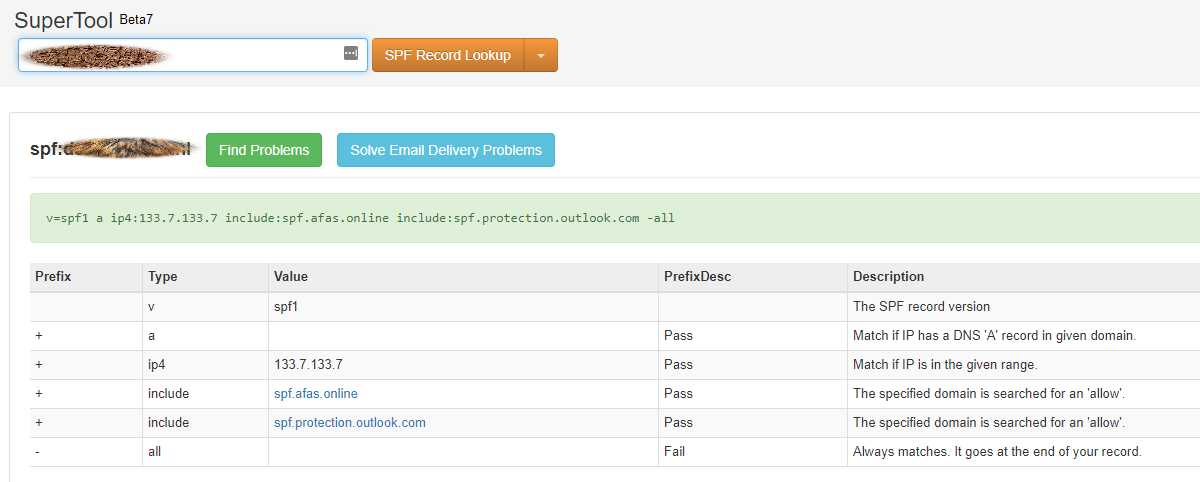
The SPF record has been configured correctly:
- If the value ‘spf.afas.online’ appears in the ‘Value’ column AND if a green bar appears above the table.
OR
- If the value ‘spf.afas.online’ is located within a ‘subinclude’. For example: ‘spf.afas.online’ is not in the main domain klant.nl, but it is in _spf1.klant.nl. AND if a green bar appears above the table for this ‘subinclude’. AFAS tests the domain five levels deep.
Below is an example of a correct SPF record:
The SPF record is not configured correctly if:
- There is no value in the ‘Value’ column that matches “spf.afas.online”.
- Or if the bar above the table is red.
Resolving the issue: MXToolbox displays the message “Too many included lookups (13)”
Try to reduce this number. You can find more information (for example, about the consequences) on the page https://mxtoolbox.com/problem/spf/spf-included-lookups. If you are unable to reduce the number of other lookups, it is possible to add the AFAS SPF record not as an ‘include’, but as an ‘ip4’. In this case, add the ranges 185.46.182.200/29 and 185.46.182.208/31 to the SPF record.