Integration group
An integration group is a collection of work types and costs. You can add integration groups and for each group determine which work types and/or costs are included in the group. Per integration group you specify for Profit Financieel a ledger account of the 'Revenue' type and a ledger account of the 'Credit entries' type to be used for journalising the invoices.
You can use integration groups for various purposes:
- For grouping work types and costs. You can then use these groups when compiling overviews.
- As a calculation basis for determining rates.
- As a calculation basis for the validity combinations.
- As a calculation basis for journalising the sales invoices and work in progress.
Configuring the integration groups is an important step in the implementation of Profit Projecten. You can also journalise using integration accounts. If you (also) use integration accounts, Profit uses the ledger accounts of integration accounts when journalising, instead of those of the integration groups. In that case, Profit therefore does not use the ledger accounts of the integration group for the work type or costs.
You can import integration groups via Start menu / Order Management / Management / Import item / Integration group or Projects / Management / Import / Integration group.
To add an integration group:
- Go to:
- General / Configuration / Integration settings / Integration group.
- Projects / Item / Groups / Integration group.
- Order Management / Item / Grouping / Integration group.
- Click on: New.
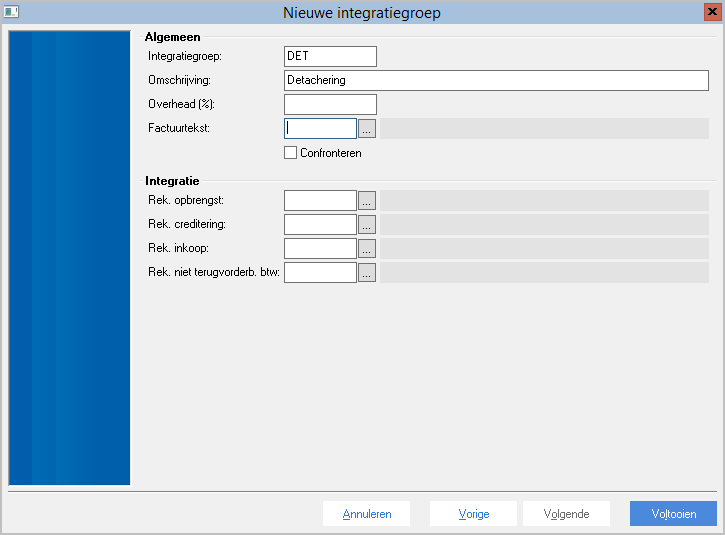
- Enter the code for the integration group.
- Enter the description.
- Select the Reconcile check box if you want to match work types and costs of an integration group with purchase invoices in Profit Financial using the reconcile goods receipt process. You can configure this if you work with Projects and Order management.
- In Revenue account, select a ledger account for revenues.
- In Credit entry acc., select a ledger account for credit entries.
- If you have selected the Reconcile check box, you must select a ledger account in Purchase acc..
Click on: Finish.