Authorise discount vouchers
If you want to use discount vouchers, you must first authorise them.
Configure authorisation:
- Go to: General / Management / Authorisation tool.
- Go to the tab: Group maintenance.
- Select the group to authorise.
- Go to the tab: Menu.
- Go to: CRM / Course management / Configuration.
- Authorise the menu option:Discount voucher.
- Go to the tab: Authorisation.
- Go to: CRM / Course / Discount voucher code / Actions.
- Authorise actions Add, Issue and Delete.
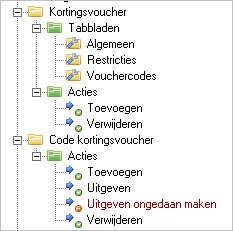
- Go to: CRM / Course / Discount voucher.
- Authorise tabs and actions:
- Close the Authorisation tool.
- Click on Yes in the message.
De omgeving opent automatisch opnieuw, met de nieuwe instellingen.
See also
|
Directly to |