Rearrange parts of a grouping

You can change the order of the grouping at any time.

To rearrange parts:

  1. Log on and start Site management.
    1. Open the site.
    2. Log on with the username and password.
    3. Click on: OK.
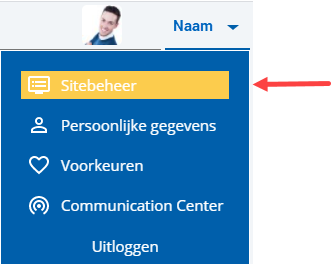
    4. Click on the user name at the top right.

      Ins_Sitebeheer opstarten (10)

    5. Click on: Site management.

  2. Open the page with the grouping you want to rearrange.
  3. Click on: Edit (in the Page frame).
  4. Click on: Layout in the Display frame.
  5. Select the grouping.
  6. Go to the tab: Parts.
  7. Move the tabs by dragging them to the right place.
  8. Close the window with the parts.
  9. Click on: Publish.
  10. Click on Yes in the message.

Directly to

  1. Grouping in InSite & OutSite
  2. Group in a carousel
  3. Group in a drop-down list
  4. Group in horizontal tabs
  5. Group in vertical tabs
  6. Rearrange parts of a grouping
  7. Modify a grouping presentation style
  8. Delete a part from a grouping
  9. Adjust the alignment of the carousel grouping
  10. Delete a grouping