System requirements for the new sign-on method
Study the system requirements. The system requirements apply to both two-factor authentication and single sign-on unless specified otherwise.
Note:
TLS1.3 is supported for connection to Profit (incoming traffic only). The support of TLS1.2 will be limited because some old ciphers will no longer be supported as of 15 December 2021. Support is expanded to include other ciphers.
|
Contents |
Computer/workstation user
Component |
Explanation |
|---|---|
Operating system |
AFAS follows Microsoft's official support policy for Windows and Windows Server. This means that AFAS is supported on all Windows and Windows Server versions that are actively supported by Microsoft. Once Microsoft ends regular support for an operating system, AFAS will also discontinue its support. Apple Mac is not formally supported by AFAS. However, it is possible to use Citrix on a Mac, see the page Which version of Citrix Workspace do I need? Also see: |
Browsers |
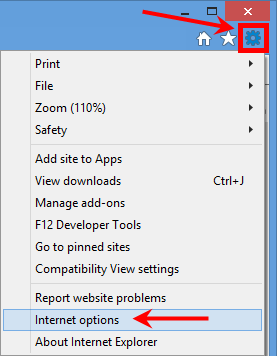
If you use Chrome, Safari or FireFox, you must configure the browser in such a way that this is automatically updated to the last version. You must add the URLs below to the Trusted Sites. If you do not, the 'The current website is trying to open a site in your Trusted sites list' message may be displayed. This is how you open the
|
TLS |
|
PCC |
|
 Trusted Sites
Network and data traffic
Component |
Explanation |
|---|---|
IP range |
|
Outgoing traffic |
|
Incoming traffic |
|
See also:
- Profit Connectors linked to the new sign-on method
AFAS Pocket
AFAS Pocket does not work on every version of iOS or Android. Please check the minimum version of your smartphone (or iPad) via Apple and Android pages. This is particularly relevant if you get a message that the app cannot be installed.
See also:
Other
- Users can sign on via AFAS Pocket with regard to two-factor authorisation (on supported iPhones or Android devices). The first step is to sign on using a username + password and the second step is to confirm via AFAS Pocket on the user's smartphone. If you only use AFAS Pocket for this authentication, you do not need to configure (the app connector of) Pocket.
A user can link AFAS Pocket for two-factor authorisation to multiple AFAS Online accounts.
Note:
AFAS Pocket offers a lot more functionality and especially with regard to Employee Self Service. If you use this solution, you must, however, execute the configuration in Profit. In this situation, AFAS Pocket is linked to one specific environment for the full use of the Pocket functionality and to one or more AFAS Online accounts for two-factor authorisation.
- With two-factor authentication, you can also log in via a supported authenticator app (instead of AFAS Pocket).
Preventing the jacking of parts of your own InSite/OutSite on an external site (anti-click jacking) is on by default. If this needs to be disabled, please submit an incident ticket. As from Profit 19, you manage this yourself in the site properties. You can, however, include a linked to an InSite/OutSite page on an external site.
You can continue to show an external page on your own site with an integration page.
- If techniques such as SSL scanning, SSL decryption, HTTPS inspection, deep packet inspection (DPI) or an intrusion prevention system (IPS) are used, this can affect performance and stability or lead to error messages. An intermediate VPN or proxy server can also cause problems depending on the settings. Consider having your IT department put AFAS Online's network traffic on an allow list for these methods. If only to conclude whether it could be the cause of a particular problem. AFAS' addresses can be found in the article System requirements Citrix platform.
Restricting login to a specific IP address (IP restrictions)
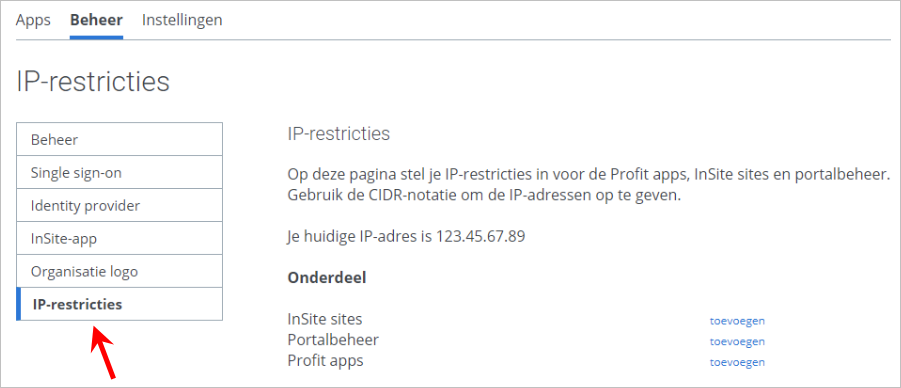
The administrator can set IP restrictions on the AFAS Online portal, via Manage / IP restrictions. You set up IP restrictions per component (Profit, InSite, Management). IP restrictions apply to both two-factor authentication and single sign-on.
If you do not define IP restrictions, no IP restrictions are applied.
If you do define IP restrictions, users can only launch the applications (apps) from IP addresses that are allowed based on the IP restrictions, this is an additional protection against unwanted visitors. You always use the CIDR notation.
Note:
Users can always log in, regardless of IP restrictions. Only when starting the apps (Profit, InSite or management) is it checked whether IP restrictions apply.
A user accessing InSite via a URL (favourite) must then log in first. It is then checked whether IP restrictions apply.
You can define different IP restrictions. For administrators, you can define IP addresses of the home workplace in addition to the work IP address, for example.
You can set IPv6 restrictions, but they are not yet active! This feature is still under development.
IP addresses, URLs and ciphers
This information is intended for organisations that use a whitelist on the firewall or a proxy.
RSA-Certificate
The connection with Profit (the Citrix connection) uses a RSA certificate. There are three TLS 1.3 ciphers and two TLS 1.2 ciphers:
TLS 1.3
- TLS_AES_256_GCM_SHA384 (0x13,0x02)
- TLS_AES_128_GCM_SHA256 (0x13,0x01)
- TLS_CHACHA20_POLY1305_SHA256 (0x13,0x03)
TLS 1.2
- TLS_ECDHE_RSA_WITH_AES_256_GCM_SHA384 (0xC0,0x30)
- TLS_ECDHE_RSA_WITH_CHACHA20_POLY1305_SHA256 (0xCC,0xA8)
- TLS_ECDHE_RSA_WITH_AES_128_GCM_SHA256 (0xC0,0x2F)
ECC certificate
All other connections (Connector, InSite, OutSite, etc.) use an ECC certificate. There are 3 TLS 1.3-ciphers and 2 TLS 1.2-ciphers:
TLS 1.3
- TLS_AES_256_GCM_SHA384 (0x13,0x02)
- TLS_AES_128_GCM_SHA256 (0x13,0x01)
- TLS_CHACHA20_POLY1305_SHA256 (0x13,0x03)
TLS 1.2
- TLS_ECDHE_ECDSA_WITH_AES_256_GCM_SHA384 (0xC0,0x2C)
- TLS_ECDHE_ECDSA_WITH_AES_128_GCM_SHA256 (0xC0,0x2B)
The TLS 1.3 cipher suites for the RSA certificate and the ECC certificate are the same. The only difference lies in the TLS 1.2 ciphers: an RSA certificate uses RSA-based cipher suites (TLS_ECDHE_RSA_), whilst an ECC certificate uses ECDSA-based cipher suites (TLS_ECDHE_ECDSA_). The cipher suite IDs are shown above in the format of two separate hex bytes.
Key exchange
For the key exchange the following elliptic curves are used:
- ECC-Certificate: secp256r1 (P-256)
- RSA-Certificate (Citrix): secp256r1 (P-256) and secp384r1 (P-384)
Overview of all endpoints and theTLS version required
The following ciphers are supported:
- TLS_AES_256_GCM_SHA384 (0x13,0x02)
- TLS_AES_128_GCM_SHA256 (0x13,0x01)
- TLS_CHACHA20_POLY1305_SHA256 (0x13,0x03)
- TLS_ECDHE_RSA_WITH_AES_256_GCM_SHA384 (0xC0,0x30)
- TLS_ECDHE_RSA_WITH_CHACHA20_POLY1305_SHA256 (0xCC,0xA8)
- TLS_ECDHE_RSA_WITH_AES_128_GCM_SHA256 (0xC0,0x2F)
- TLS_ECDHE_ECDSA_WITH_AES_256_GCM_SHA384 (0xC0,0x2C)
- TLS_ECDHE_ECDSA_WITH_AES_128_GCM_SHA256 (0xC0,0x2B).
PCC
Applications |
Explanation |
Host name |
Public IP |
Ports |
TLS- |
TLS Ciphers [1] |
Cipher suite (name) |
Certificate |
InSite, PCC
|
PCC Notification hub. This must be available to all users who use the PCC. |
pc**.notificationhub.afas.online
|
185.46.182.28 185.46.182.43 185.46.182.29 185.46.182.36
|
443
|
1.3 |
[0x13,0x02], [0x13,0x01], [0x13,0x03] |
TLS_AES_256_GCM_SHA384 TLS_AES_128_GCM_SHA256 TLS_CHACHA20_POLY1305_SHA256 |
ECC |
1.2 |
[0xC0,0x2C], [0xC0,0x2B] |
TLS_ECDHE_ECDSA_WITH_AES_256_GCM_SHA384 TLS_ECDHE_ECDSA_WITH_AES_128_GCM_SHA256 |
ECC |
|||||
Connector, PCC
|
SOAP API for production environments. This must be available for all connections/connectors and PCC users. |
[participant].soap.afas.online
|
185.46.182.140 thru 185.46.182.179.
|
443
|
1.3 |
[0x13,0x02], [0x13,0x01], [0x13,0x03] |
TLS_AES_256_GCM_SHA384 TLS_AES_128_GCM_SHA256 TLS_CHACHA20_POLY1305_SHA256 |
ECC |
1.2 |
[0xC0,0x2C], [0xC0,0x2B] |
TLS_ECDHE_ECDSA_WITH_AES_256_GCM_SHA384 TLS_ECDHE_ECDSA_WITH_AES_128_GCM_SHA256 |
ECC |
|||||
Connector, PCC
|
SOAP API for test environments. This must be available for all connections/connectors and PCC users who link up to test environments.
|
[participant].soaptest.afas.online
|
185.46.182.180 thru 185.46.182.199.
|
443
|
1.3 |
[0x13,0x02], [0x13,0x01], [0x13,0x03] |
TLS_AES_256_GCM_SHA384 TLS_AES_128_GCM_SHA256 TLS_CHACHA20_POLY1305_SHA256 |
ECC |
1.2 |
[0xC0,0x2C] [0xC0,0x2B] |
TLS_ECDHE_ECDSA_WITH_AES_256_GCM_SHA384 TLS_ECDHE_ECDSA_WITH_AES_128_GCM_SHA256 |
ECC |
|||||
Connector, PCC
|
SOAP API for accept environments. This must be available for all connections/connectors and PCC users who link up to accept environments.
|
[participant].soapaccept.afas.online
|
185.46.182.45 185.46.182.47
|
443
|
1.3 |
[0x13,0x02], [0x13,0x01], [0x13,0x03] |
TLS_AES_256_GCM_SHA384 TLS_AES_128_GCM_SHA256 TLS_CHACHA20_POLY1305_SHA256 |
ECC |
1.2 |
[0xC0,0x2C], [0xC0,0x2B] |
TLS_ECDHE_ECDSA_WITH_AES_256_GCM_SHA384 TLS_ECDHE_ECDSA_WITH_AES_128_GCM_SHA256 |
ECC |
|||||
Connector, PCC
|
REST API for production environments. This must be available for all connections/connectors and PCC users.
|
[participant].rest.afas.online
|
185.46.182.140 thru 185.46.182.179.
|
443
|
1.3 |
[0x13,0x02], [0x13,0x01], [0x13,0x03] |
TLS_AES_256_GCM_SHA384 TLS_AES_128_GCM_SHA256 TLS_CHACHA20_POLY1305_SHA256 |
ECC |
1.2 |
[0xC0,0x2C], [0xC0,0x2B] |
TLS_ECDHE_ECDSA_WITH_AES_256_GCM_SHA384 TLS_ECDHE_ECDSA_WITH_AES_128_GCM_SHA256 |
ECC |
|||||
Connector, PCC
|
REST API for test environments. This must be available for all connections/connectors and PCC users who link up to test environments.
|
[participant].resttest.afas.online
|
185.46.182.180 thru 185.46.182.199.
|
443
|
1.3 |
[0x13,0x02], [0x13,0x01], [0x13,0x03] |
TLS_AES_256_GCM_SHA384 TLS_AES_128_GCM_SHA256 TLS_CHACHA20_POLY1305_SHA256 |
ECC |
1.2 |
[0xC0,0x2C], [0xC0,0x2B] |
TLS_ECDHE_ECDSA_WITH_AES_256_GCM_SHA384 TLS_ECDHE_ECDSA_WITH_AES_128_GCM_SHA256 |
ECC |
|||||
Connector, PCC
|
REST API for accept environments. This must be available for all connections/connectors and PCC users who link up to accept environments.
|
[participant].restaccept.afas.online
|
185.46.182.44 185.46.182.46
|
443
|
1.3 |
[0x13,0x02], [0x13,0x01], [0x13,0x03] |
TLS_AES_256_GCM_SHA384 TLS_AES_128_GCM_SHA256 TLS_CHACHA20_POLY1305_SHA256 |
ECC |
1.2 |
[0xC0,0x2C], [0xC0,0x2B] |
TLS_ECDHE_ECDSA_WITH_AES_256_GCM_SHA384 TLS_ECDHE_ECDSA_WITH_AES_128_GCM_SHA256 |
ECC |
|||||
InSite
|
InSite. Must be available to all InSite users.
|
[participant].afasinsite.nl
|
185.46.182.60 thru 185.46.182.78
|
80 (redirect), 443
|
1.3 |
[0x13,0x02], [0x13,0x01], [0x13,0x03] |
TLS_AES_256_GCM_SHA384 TLS_AES_128_GCM_SHA256 TLS_CHACHA20_POLY1305_SHA256 |
ECC |
1.2 |
[0xC0,0x2C], [0xC0,0x2B] |
TLS_ECDHE_ECDSA_WITH_AES_256_GCM_SHA384 TLS_ECDHE_ECDSA_WITH_AES_128_GCM_SHA256 |
ECC |
|||||
InSite (test)
|
InSite test sites. Must be available to all InSite users who must be able to sign on to InSite sites of test environments. |
[participant].insitetest.afas.online
|
185.46.182.80 thru 185.46.182.94
|
80 (redirect), 443
|
1.3 |
[0x13,0x02], [0x13,0x01], [0x13,0x03] |
TLS_AES_256_GCM_SHA384 TLS_AES_128_GCM_SHA256 TLS_CHACHA20_POLY1305_SHA256 |
ECC |
1.2 |
[0xC0,0x2C], [0xC0,0x2B] |
TLS_ECDHE_ECDSA_WITH_AES_256_GCM_SHA384 TLS_ECDHE_ECDSA_WITH_AES_128_GCM_SHA256 |
ECC |
|||||
InSite (accept)
|
InSite accept sites. Must be available to all InSite users who must be able to sign on to InSite sites of accept environments.
|
[participant].insiteaccept.afas.online
|
185.46.182.95 185.46.182.96
|
80 (redirect), 443
|
1.3 |
[0x13,0x02], [0x13,0x01], [0x13,0x03] |
TLS_AES_256_GCM_SHA384 TLS_AES_128_GCM_SHA256 TLS_CHACHA20_POLY1305_SHA256 |
ECC |
1.2 |
[0xC0,0x2C], [0xC0,0x2B] |
TLS_ECDHE_ECDSA_WITH_AES_256_GCM_SHA384 TLS_ECDHE_ECDSA_WITH_AES_128_GCM_SHA256 |
ECC |
Login portal (InSite + Profit)
Applications |
Explanation |
Host name |
Public IP |
Ports |
TLS- |
TLS Ciphers [1] |
Cipher suite (name) |
Certificate |
InSite, Profit
|
Login Portal. All users sign on here through the browser.
|
www.afasonline.nl
|
185.46.182.11
|
80 (redirect), 443
|
1.3 |
[0x13,0x02], [0x13,0x01], [0x13,0x03] |
TLS_AES_256_GCM_SHA384 TLS_AES_128_GCM_SHA256 TLS_CHACHA20_POLY1305_SHA256 |
ECC |
1.2 |
[0xC0,0x2C], [0xC0,0x2B] |
TLS_ECDHE_ECDSA_WITH_AES_256_GCM_SHA384 TLS_ECDHE_ECDSA_WITH_AES_128_GCM_SHA256 |
ECC |
|||||
InSite, Profit
|
Secure Token Service. This must be available to all users.
|
sts.afasonline.com
|
185.46.182.12
|
443
|
1.3 |
[0x13,0x02], [0x13,0x01], [0x13,0x03] |
TLS_AES_256_GCM_SHA384 TLS_AES_128_GCM_SHA256 TLS_CHACHA20_POLY1305_SHA256 |
ECC |
1.2 |
[0xC0,0x2C], [0xC0,0x2B] |
TLS_ECDHE_ECDSA_WITH_AES_256_GCM_SHA384 TLS_ECDHE_ECDSA_WITH_AES_128_GCM_SHA256 |
ECC |
|||||
InSite, Profit
|
If using federation (SSO), this address must also be accessible for the federation server (for example, ADFS) on site. Outgoing oAuth/OpenID Connect connections may not occur from this IP range.
|
sts.afasonline.com
|
185.46.182.0/24
(dus 185.46.182.1 thru 185.46.182.254)
|
443
|
1.3 |
[0x13,0x02], [0x13,0x01], [0x13,0x03] |
TLS_AES_256_GCM_SHA384 TLS_AES_128_GCM_SHA256 TLS_CHACHA20_POLY1305_SHA256 |
ECC |
1.2 |
[0xC0,0x2C], [0xC0,0x2B] |
TLS_ECDHE_ECDSA_WITH_AES_256_GCM_SHA384 TLS_ECDHE_ECDSA_WITH_AES_128_GCM_SHA256 |
ECC |
|||||
InSite, Profit
|
Identity Provider. This must be available to all users to ensure they can sign on to the portal.
|
idp.afasonline.com
|
185.46.182.13
|
443
|
1.3 |
[0x13,0x02], [0x13,0x01], [0x13,0x03] |
TLS_AES_256_GCM_SHA384 TLS_AES_128_GCM_SHA256 TLS_CHACHA20_POLY1305_SHA256 |
ECC |
1.2 |
[0xC0,0x2C], [0xC0,0x2B] |
TLS_ECDHE_ECDSA_WITH_AES_256_GCM_SHA384 TLS_ECDHE_ECDSA_WITH_AES_128_GCM_SHA256 |
ECC |
|||||
Profit |
Citrix Netscaler. The Citrix Client makes a connection using this address (portal.afasonline.com) |
portal.afasonline.com
|
185.46.182.122
|
443
|
1.3 |
[0x13,0x02], [0x13,0x03], [0x13,0x01] |
TLS_AES_256_GCM_SHA384 TLS_CHACHA20_POLY1305_SHA256 TLS_AES_128_GCM_SHA256 |
ECC |
1.2 |
[0xC0,0x30], [0xC0,0x2F] [0xCC,0xA8] |
TLS_ECDHE_RSA_WITH_AES_256_GCM_SHA384 TLS_ECDHE_RSA_WITH_AES_128_GCM_SHA256 TLS_ECDHE_RSA_WITH_CHACHA20_POLY1305_SHA256 |
ECC |
|||||
Bankkoppeling
|
Bank Integration Portal. Required to change banking links. Redirect from the bank website.
|
bis.afasonline.com
|
185.46.182.37
|
443
|
1.3 |
[0x13,0x02], [0x13,0x01], [0x13,0x03] |
TLS_AES_256_GCM_SHA384 TLS_AES_128_GCM_SHA256 TLS_CHACHA20_POLY1305_SHA256 |
ECC |
1.2 |
[0xC0,0x2C], [0xC0,0x2B] |
TLS_ECDHE_ECDSA_WITH_AES_256_GCM_SHA384 TLS_ECDHE_ECDSA_WITH_AES_128_GCM_SHA256 |
ECC |
Additional for InSite
Applications |
Explanation |
Host name |
Public IP |
Ports |
TLS- |
TLS Ciphers [1] |
Cipher suite (name) |
Certificate |
InSite
|
InSite. Moet beschikbaar zijn voor alle InSite-gebruikers.
|
[participant].afasinsite.nl
|
185.46.182.60 thru 185.46.182.78
|
80 (redirect), 443
|
1.3 |
[0x13,0x02], [0x13,0x01], [0x13,0x03] |
TLS_AES_256_GCM_SHA384 TLS_AES_128_GCM_SHA256 TLS_CHACHA20_POLY1305_SHA256 |
ECC |
1.2 |
[0xC0,0x2C], [0xC0,0x2B] |
TLS_ECDHE_ECDSA_WITH_AES_256_GCM_SHA384 TLS_ECDHE_ECDSA_WITH_AES_128_GCM_SHA256 |
ECC |
|||||
InSite
|
InSite-testsites. Moet beschikbaar zijn voor alle InSite-gebruikers die op InSites van testomgevingen moeten kunnen inloggen.
|
[participant].insitetest.afas.online
|
185.46.182.80 thru 185.46.182.94
|
80 (redirect), 443
|
1.3 |
[0x13,0x02], [0x13,0x01], [0x13,0x03] |
TLS_AES_256_GCM_SHA384 TLS_AES_128_GCM_SHA256 TLS_CHACHA20_POLY1305_SHA256 |
ECC |
1.2 |
[0xC0,0x2C], [0xC0,0x2B] |
TLS_ECDHE_ECDSA_WITH_AES_256_GCM_SHA384 TLS_ECDHE_ECDSA_WITH_AES_128_GCM_SHA256 |
ECC |
|||||
InSite
|
InSite-acceptsites. Moet beschikbaar zijn voor alle InSite-gebruikers die op InSites van acceptomgevingen moeten kunnen inloggen.
|
[participant].insiteaccept.afas.online
|
185.46.182.95 185.46.182.96
|
80 (redirect), 443
|
1.3 |
[0x13,0x02], [0x13,0x01], [0x13,0x03] |
TLS_AES_256_GCM_SHA384 TLS_AES_128_GCM_SHA256 TLS_CHACHA20_POLY1305_SHA256 |
ECC |
1.2 |
[0xC0,0x2C], [0xC0,0x2B] |
TLS_ECDHE_ECDSA_WITH_AES_256_GCM_SHA384 TLS_ECDHE_ECDSA_WITH_AES_128_GCM_SHA256 |
ECC |
|||||
InSite
|
Analytics voor AFAS InSite. Deze moet voor iedere InSite-gebruiker beschikbaar zijn voor diagnostische doeleinden.
|
statistics.afas.online
|
185.46.182.27
|
443
|
1.3 |
[0x13,0x02], [0x13,0x01], [0x13,0x03] |
TLS_AES_256_GCM_SHA384 TLS_AES_128_GCM_SHA256 TLS_CHACHA20_POLY1305_SHA256 |
ECC |
1.2 |
[0xC0,0x2C], [0xC0,0x2B] |
TLS_ECDHE_ECDSA_WITH_AES_256_GCM_SHA384 TLS_ECDHE_ECDSA_WITH_AES_128_GCM_SHA256 |
ECC |
Additional for OutSite
Applications |
Explanation |
Domeinnaam |
Public IP |
Ports |
TLS- |
Certificate |
OutSite |
|
Afhankelijk van je type omgeving krijg je van AFAS een van de volgende domeinnamen: *.outsitetijdelijk.afas.online *.outsitetest.afas.online *.outsitedemo.nl *.outsiteaccept.afas.online *.outsitecursus.nl *.outsitebeta.nl *.outsitefocusmig.afas.online In productieomgevingen kan een OutSite-URL actief zijn met eigen domeinnaam. Die eigen URL heb je dan zelf aangevraagd via de daarvoor bestemde workflow
|
185.46.183.1 thru 185.46.183.200
|
80 (redirect), 443 |
1.2 en 1.3 |
ECC |
Connectors
Applications |
Explanation |
Host name |
Public IP |
Ports |
TLS- |
TLS Ciphers [1] |
Cipher suite (name) |
Certificate |
||
Connector, PCC
|
SOAP API for production environments. This should be available for all links/connectors and PCC users. |
[participant].soap.afas.online
|
185.46.182.140 thru 185.46.182.179.
|
443
|
1.3 |
[0x13,0x02], [0x13,0x01], [0x13,0x03] |
TLS_AES_256_GCM_SHA384 TLS_AES_128_GCM_SHA256 TLS_CHACHA20_POLY1305_SHA256 |
ECC |
||
1.2 |
[0xC0,0x2C], [0xC0,0x2B] |
TLS_ECDHE_ECDSA_WITH_AES_256_GCM_SHA384 TLS_ECDHE_ECDSA_WITH_AES_128_GCM_SHA256 |
ECC |
|||||||
Connector, PCC
|
SOAP API for test environments. This should be available for all links/connectors and PCC users that link to a test site.
|
[participant].soaptest.afas.online
|
185.46.182.180 thru 185.46.182.199.
|
443
|
1.3 |
[0x13,0x02], [0x13,0x01], [0x13,0x03] |
TLS_AES_256_GCM_SHA384 TLS_AES_128_GCM_SHA256 TLS_CHACHA20_POLY1305_SHA256 |
ECC |
||
1.2 |
[0xC0,0x2C], [0xC0,0x2B] |
TLS_ECDHE_ECDSA_WITH_AES_256_GCM_SHA384 TLS_ECDHE_ECDSA_WITH_AES_128_GCM_SHA256 |
ECC |
|||||||
Connector, PCC
|
SOAP API for accept environments. This should be available for all links/connectors and PCC users that link to an accept site.
|
[participant].soapaccept.afas.online
|
185.46.182.45 185.46.182.47
|
443
|
1.3 |
[0x13,0x02], [0x13,0x01], [0x13,0x03] |
TLS_AES_256_GCM_SHA384 TLS_AES_128_GCM_SHA256 TLS_CHACHA20_POLY1305_SHA256 |
ECC |
||
1.2 |
[0xC0,0x2C], [0xC0,0x2B] |
TLS_ECDHE_ECDSA_WITH_AES_256_GCM_SHA384 TLS_ECDHE_ECDSA_WITH_AES_128_GCM_SHA256 |
ECC |
|||||||
Connector, PCC
|
REST API for production environments. This should be available for all links/connectors and PCC users. |
[participant].rest.afas.online
|
185.46.182.140 thru 185.46.182.179.
|
443
|
1.3 |
[0x13,0x02], [0x13,0x01], [0x13,0x03] |
TLS_AES_256_GCM_SHA384 TLS_AES_128_GCM_SHA256 TLS_CHACHA20_POLY1305_SHA256 |
ECC |
||
1.2 |
[0xC0,0x2C], [0xC0,0x2B] |
TLS_ECDHE_ECDSA_WITH_AES_256_GCM_SHA384 TLS_ECDHE_ECDSA_WITH_AES_128_GCM_SHA256 |
ECC |
|||||||
Connector, PCC
|
REST API for test environments. This should be available for all links/connectors and PCC users that link to a test site. |
[participant].resttest.afas.online
|
185.46.182.180 thru 185.46.182.199.
|
443
|
1.3 |
[0x13,0x02], [0x13,0x01], [0x13,0x03] |
TLS_AES_256_GCM_SHA384 TLS_AES_128_GCM_SHA256 TLS_CHACHA20_POLY1305_SHA256 |
ECC |
||
1.2 |
[0xC0,0x2C], [0xC0,0x2B] |
TLS_ECDHE_ECDSA_WITH_AES_256_GCM_SHA384 TLS_ECDHE_ECDSA_WITH_AES_128_GCM_SHA256 |
ECC |
|||||||
Connector, PCC
|
REST API for accept environments. This should be available for all links/connectors and PCC users that link to an accept site.
|
[participant].restaccept.afas.online
|
185.46.182.44 185.46.182.46
|
443
|
1.3 |
[0x13,0x02], [0x13,0x01], [0x13,0x03] |
TLS_AES_256_GCM_SHA384 TLS_AES_128_GCM_SHA256 TLS_CHACHA20_POLY1305_SHA256 |
ECC |
||
1.2 |
[0xC0,0x2C], [0xC0,0x2B] |
TLS_ECDHE_ECDSA_WITH_AES_256_GCM_SHA384 TLS_ECDHE_ECDSA_WITH_AES_128_GCM_SHA256 |
ECC |
|||||||
Outgoing traffic
Applications |
Explanation |
Host name |
Public IP |
Ports |
TLS- |
TLS Ciphers [1] |
Certificate |
Variable |
Standard outgoing IP address AFAS Online. Any communication profiles and/or connections to your own Exchange or email servers originate from this address. |
185.46.182.0/24 (so 185.46.182.1 thru 185.46.182.254) |
185.46.182.0/24
|
Variable |
1.2 and 1.3 |
Variable |
N.v.t. |
Outgoing mail
Applications |
Explanation |
Host name |
Public IP |
Ports |
TLS- |
TLS Ciphers [1] |
Certificate |
Variable |
Mail MTA. Used for sending outgoing emails when using the AFAS.ONLINE mail server. SPF: afas.online |
mail.afas.online |
185.46.182.200 |
25 |
1.2 en 1.3 |
Variable |
N/A |
Variable |
Mail MTA. Used for sending outgoing emails when using the AFAS.ONLINE mail server. SPF: afas.online |
mta1.afas.online |
185.46.182.201 |
25 |
1.2 en 1.3 |
Variable |
N/A |
Variable |
Mail MTA. Used for sending outgoing emails when using the AFAS.ONLINE mail server. SPF: afas.online |
mta2.afas.online |
185.46.182.202 |
25 |
1.2 en 1.3 |
Variable |
N/A |
Variable |
Mail MTA. Used for sending outgoing emails when using the AFAS.ONLINE mail server. SPF: afas.online |
mta3.afas.online |
185.46.182.203 |
25 |
1.2 en 1.3 |
Variable |
N/A |
Variable |
Mail MTA. Used for sending outgoing emails when using the AFAS.ONLINE mail server. SPF: afas.online |
mta4.afas.online |
185.46.182.204 |
25 |
1.2 en 1.3 |
Variable |
N/A |
Variable |
Mail MTA. Used for sending outgoing emails when using the AFAS.ONLINE mail server. SPF: afas.online |
mta5.afas.online |
185.46.182.205 |
25 |
1.2 en 1.3 |
Variable |
N/A |
Variable |
Mail MTA. Used for sending outgoing emails when using the AFAS.ONLINE mail server. SPF: afas.online |
mta6.afas.online |
185.46.182.206 |
25 |
1.2 en 1.3 |
Variable |
N/A |
Variable |
Mail MTA. Used for sending outgoing emails when using the AFAS.ONLINE mail server. SPF: afas.online |
mta7.afas.online |
185.46.182.207 |
25 |
1.2 en 1.3 |
Variable |
N/A |
Variable |
Mail MTA. Used for sending outgoing emails when using the AFAS.ONLINE mail server. SPF: afas.online |
mta8.afas.online |
185.46.182.208 |
25 |
1.2 en 1.3 |
Variable |
N/A |
Variable |
Mail MTA. Used for sending outgoing emails when using the AFAS.ONLINE mail server. SPF: afas.online |
mta9.afas.online |
185.46.182.209 |
25 |
1.2 en 1.3 |
Variable |
N/A |
Diversen
Applications |
Explanation |
Host name |
Public IP |
Ports |
TLS- |
TLS Ciphers [1] |
Cipher suite (name) |
Certificate |
FileUpload
|
File Upload for delivery of enviroroments/archives when migration from on-premise to AFAS Online via Order / klant.afas.nl.
|
upload.afasonline.com
|
185.46.182.230
|
443
|
1.3 |
[0x13,0x02], [0x13,0x01], [0x13,0x03] |
TLS_AES_256_GCM_SHA384 TLS_AES_128_GCM_SHA256 TLS_CHACHA20_POLY1305_SHA256 |
ECC |
1.2 |
[0xC0,0x2C], [0xC0,0x2B] |
TLS_ECDHE_ECDSA_WITH_AES_256_GCM_SHA384 TLS_ECDHE_ECDSA_WITH_AES_128_GCM_SHA256 |
ECC |
|||||
FileDownload
|
File Download for requests of environments to be archived. Mostly used when ending a subscription, This download solution is also used by AFAS Support, Service management and Consultancy for the exchange of large files. |
download.afasonline.com
|
185.46.182.230
|
443
|
1.3 |
[0x13,0x02], [0x13,0x01], [0x13,0x03] |
TLS_AES_256_GCM_SHA384 TLS_AES_128_GCM_SHA256 TLS_CHACHA20_POLY1305_SHA256 |
ECC |
1.2 |
[0xC0,0x2C], [0xC0,0x2B] |
TLS_ECDHE_ECDSA_WITH_AES_256_GCM_SHA384 TLS_ECDHE_ECDSA_WITH_AES_128_GCM_SHA256 |
ECC |