Configure the integration of the salary indicator in AFAS Personal
|
Content |
Video
Description
If you issue the pay slips in AFAS Personal, the employee sees the pay slips in the personal account of the employee. AFAS Personal shows a clear overview of all the pay slips. The employee can see the main pay slip details at a glance, for more insight into the income. In addition to viewing the pay slips, the employee can also use the other functionality of AFAS Personal. This gives the employee insight into the expenditures in addition to the income.
Use the integration with AFAS Personal
If you want to use the integration with AFAS Personal, you can contact the Sales department at e-mail address sales@afas.nl.
Configure the integration
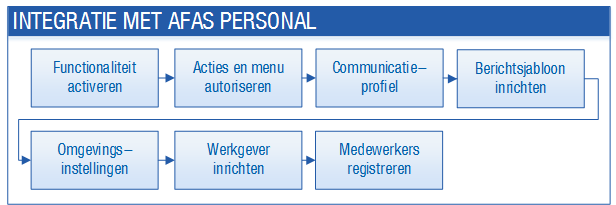
Configure the integration as follows:
Procedure
- Activate the pay slip issuing functionality in AFAS Personal
The option to provide a salary indicator in AFAS Personal is only available if you use the Issue pay slips via AFAS Personal functionality.
- Change the authorisation for the integration of the salary indicator with AFAS Personal
Configure the authorisation of this section, so that the right users have access to the required functions and data.
- Configure the AFAS Personal communication profile
For the integration of the salary indicator with AFAS Personal, unblock the communication profile.
- Configure an AFAS Personal e-mail message template
For the integration with AFAS Personal, invite all employees by e-mail. For this e-mail, you configure an e-mail message template.
- Record environment settings for the integration of the salary indicator with AFAS Personal
You register every environment in AFAS Personal, for the integration of the salary indicator with AFAS Personal.
- Change the employer settings for the integration of the salary indicator
For the integration of the salary indicator with AFAS Personal, change the settings for issuing the pay slips.
- Register employees for AFAS Personal
For the integration with AFAS Personal, you register the employees for AFAS Personal.
- Integrate preceding periods with AFAS Personal
If you also want pay slips from previous months to be available in AFAS Personal, then you issue the pay slips for these months again.
- Invite an employee for AFAS Personal again
If the employee loses the e-mail, you can send the employee an invitation once again.