Configure e-mailing and printing for a purchase contact
You record the basic configuration for printing and e-mailing reports to purchase contacts in the purchase contact profile. You then record the purchase contact's preference and the contact person. Finally, for each report you can still deviate from this preference and, if necessary, add a different or an extra contact.
Description
You record the e-mailing and/or printing of reports for your purchase contacts at various levels. If you record a deviating supply type for a report, then the setting in the properties of the purchase contact will be overwritten.
You can opt to e-mail most reports but always print a receipt of goods. In that case, you specify E-mail as the preference of the sales contact. For the receipt of goods, you set the deviating Print action in the properties of the purchase contact.
Preparation
Procedure
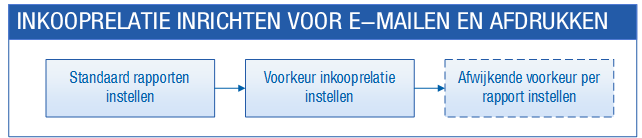
- Set default reports in a purchase contact profile
In the purchase contact profile, you link the reports and message templates for each report type.
- Set a general preference for e-mailing or printing for a purchase contact
For the purchase contact, you can record the general preference for the issue method: e-mailing or printing. Here you also record the preferred contact person that you can address.
- Set a deviating issue method and contact person per report type for a purchase contact
For the purchase contact, you can deviate from the general settings for each report type. For example, you can indicate here that you always want to print a specific report. You can also specify a deviating contact person for each report type.
- Issue a purchase order or payment specification (usage)
You print your reports or e-mail them to your contacts. You can print reports using the Print or Output action. You have two options for e-mail: the E-mail and the Output actions.