Frequently asked questions about Payroll
|
Payroll |
|
|
|
|
You cannot generate an audit file in Profit Payroll. In addition, it is not required to send an audit file for the wages to the tax authority. For the tax authority, it is easier to receive an audit file, but this is not required. For the delivery of payroll data to the tax authority, you can use the following:
The tax authority can use this number to identify the income relationship of an employee within a taxpayer. As long as the income relationship continues to exist, you must use the same number, even if you switch to a different salary software package, for instance. Therefore, if you switch from another package to Profit, you must copy the income relationship number for each employee from the old package to Profit. The income relationship number must be unique for each taxpayer and for each employee. If the employee re-enters employment or receives a benefit again, this is a different income relationship. You must assign a new number that you have not yet used for this employee to the relationship. If you use the Multiple employments functionality, you must enter a unique number for each employment type. You use the employment wizard to record this value in the first contract of the employee. You can change the value in the first contract of the employee. If the employee re-enters employment, Profit will automatically increment this field. For a new employee, you can usually accept the default value, except when you are switching to Profit from a different software package. You can view the income relationship number in the contract properties at the employee level and in the employee data of the digital declaration.
In Profit, you cannot undo the approval of salary processing or delete the approved salary processing. If the approved period is not correct, you can repair this using a correction period.
AFAS cannot change or cancel payment files. You can contact the bank for information on changing and cancelling the payment. See also There is a difference between the calculation of the hourly wage in the salary processing and the calculation of the hourly wage in the properties of the employee. This difference is caused by application of the number of hours in the calculation. Example: employee properties:
Example: salary processing period with 22 'SV' days:
Example: salary processing period met 20 'SV' days:
In addition to this, it may be indicated in the properties of the CLA that the Calendar days method should be used in the weighted period calculation. See also
Profit uses wage components to calculate the legal premiums, percentages or values. These wage components use salary tables or parameters that contain the current legal premium, percentage or value. Profit does not come with a default report with this data, because Profit determines the data dynamically. The data depends on multiple factors. This cannot be shown in a default report. You can create your own report with the parameter values. If your accountant needs the data, the accountant can view the data in Profit itself. See also
The appearance of the line 'Correction from period X' on the pay slip often leads you or the employee to ask where the correction has come from. The correction is always caused by a change at one of the levels of the payroll configuration. To ascertain the cause of the correction, run through the configuration levels in Profit.:
See also
If you generate a replacement pay slip from a correction period, you are generating a difference pay slip. You can only generate a replacement pay slip from the main period in the salary processing cockpit. Note: You can generate a replacement pay slip after you have approved the correction period.
See also
A CLA Update or Profit Update can force RAE entries which do not affect the gross/net calculation of the pay slip. This way, Profit does in fact generate a replacement pay slip, but it does not feature any corrections. You cannot suppress these pay slips. See also
You can find the minimum wages in the 'Minimumloon' salary table on the Salary table tab in the properties of the CLA. See also
Profit only processes the wages for the following employee types:
Profit automatically includes employee of this type in the wage declaration. You select the employee type in the contract of the employee. More information:
When preparing the wage declaration, the following message appears: An error occurred when creating the journal entry for the wage declaration. The wage declaration has been prepared, but the payment must be made manually. The message appears only once and the wage declaration has been prepared. However, in Profit Financial no outstanding item has been created for the creditor 'Tax authority’, that has been set up via Financial / Management / Administration settings / Payment to Tax authoritiy tab. For this period, you can now no longer automatically generate the outstanding item and we recommend you enter the item manually via the purchase journal for the tax authority as a creditor. Possible causes: Period is blocked in Financial: The period in Financial in which the entry is created is blocked in the period table. This refers to the financial period table with the period in which the outstanding item is entered.
Purchase journal counter is not correct: When creating the outstanding item for the tax authority, an invoice number is provided and this number cannot be set correctly in this case.
|
|||
|
||||
|
|
|||
 How do I make an audit file for the tax authority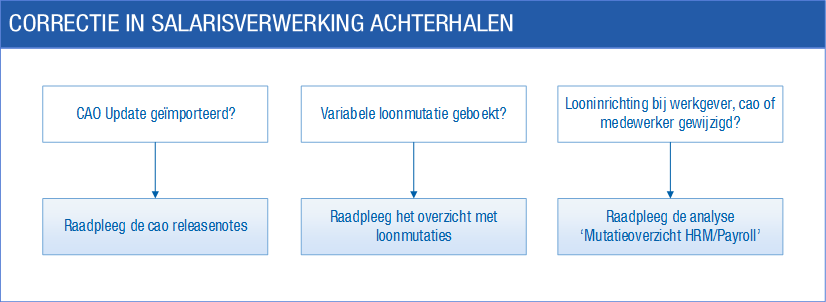
|
HR |
|
|
|
|
If an employee does not appear in the view, this could be for the following reasons:
Depending on the place, you generate a document that is based on the correct basis. If you add a document layout yourself then bear this in mind. If a document is not based on the correct basis, this does not become apparent when a dossier item is submitted. More information:
Profit displays employees without a contract in the ‘Current employee data’ data collection with the value -1 for the employment number. You cannot record a preferred value for fields on the Contract, Salary, Timetable, Job and Agency tabs. That is because Profit automatically copies the properties of the preceding lines (with the exception of the start and end dates).
De Wet Bescherming Persoonsgegevens regelt de bescherming van gegevens die over personen worden geregistreerd in digitale systemen. Volgens deze wet wordt AFAS gekenmerkt als de verwerker van de persoonsgegevens en ben je als afnemer van Profit de verantwoordelijke voor de bescherming van de persoonsgegevens. In de klantportal vind je uitleg van de manier waarop we als verwerker de persoonsgegevens in Profit beschermen volgens deze wet. Als verantwoordelijke zijn er ook een aantal zaken die onder jouw rol vallen. Deze staan hieronder beschreven.
Om welke persoonsgegevens gaat het? De persoonsgegevens leg je vast in Profit met een bepaald doel. In het geval van Profit HRM/Payroll is dat het voeren van een personeelsbeleid en een loonadministratie. Als verantwoordelijke beslis en regel je welke persoonsgegevens je wilt en moet registreren. Je registreert in dit kader de volgende gegevens in Profit over je medewerkers:
Hoe bescherm je de persoonsgegevens in jouw rol als verantwoordelijke? De Wet Bescherming Persoonsgegevens geeft opdracht om de persoonsgegevens te beschermen. AFAS neemt de algemene beveiliging voor haar rekening. Dit kun je nalezen in de SLA. Als verantwoordelijke voor de gegevens is het aan jou om de volgende aspecten voor de bescherming van de persoonsgegevens goed te regelen:
Autorisatie goed inrichten De persoonsgegevens mogen niet toegankelijk zijn voor gebruikers die er niets mee te maken hebben. Dit richt je in via autorisatie. Meer over het inrichten van de autorisatie vind je hier. Bepaalde gegevens niet registreren Volgens de wet zijn er bepaalde persoonsgegevens die je niet mag registreren. Dat zijn o.a.:
In vrije velden en elders blijft het altijd mogelijk om deze zaken te registreren. De enige zekere manier om dit soort gegevens niet in het digitale systeem te laten voorkomen, is door de gebruikers die deze gegevens vastleggen, hierover te instrueren. Verder kun je altijd velden zodanig instellen dat ze een standaardwaarde tonen of onzichtbaar zijn. Lees hierover meer bij Profielen en Voorkeurwaarde. Beveiligingsrisico’s periodiek in kaart brengen Periodiek moet je nagaan of de maatregelen die je hebt getroffen nog toereikend zijn. AFAS zal hier op algemeen niveau haar steentje aan bijdragen, maar ook op omgevingsniveau moet hier regelmatig naar gekeken worden. Controleer bijvoorbeeld of bij functiewijzigingen de autorisatie per gebruiker nog klopt, etc. Tenslotte: Op dit moment is nog niet geheel duidelijk waar de wetgever de grens legt bij de handhaving van de wet. Bovenstaande is een interpretatie van de huidige stand van zaken. Bij verschillen zal altijd de SLA op de klantportal van AFAS van toepassing zijn. Zie ook:
|
|||
|
||||
|
|
|||
|
Absence |
|
|
|
|
When an employee has been sick for more than 2 years, you can stop the salary without having to report the end of the employee's employment. To stop the salary, add a salary line on which the salary is set to 0 and add a timetable line with a timetable without hours. Also, specify an end date for all calculated wage components for the employee.
Profit updates the expected end date automatically when you run the ACTUAL command line overnight. As a result of the updating of the data, you no longer see any dates in the past.
Profit automatically selects this check box for a new absence entry in the following situations:
Profit takes into account the agencies that have been specified per employment for the tax authority agency. See also You cannot add anything to the Type of absence table because the codes in this table are linked to 'Arbo' codes.
If an employee has a number of absence entries one shortly after the other, this may be a continuous absence. Absence is considered to be continuous if within a period of 28 days before the absence entry another, closed absence entry is present. This creates a chain of absence entries, in which case Profit automatically calculates the total absence duration for all absence entries. If the chain gets broken, the continuous absence stops. For any following absence entry, Profit starts counting again. If you use the Multiple employments functionality, the following applies: the continuous absence is determined per employee, not per employment. In the case of continuous absence, Profit automatically selects the Continuous absence check box in absence entries. This rule does not apply if the previous absence entry was maternity leave (in that case, Profit does not select the check box). In the following situations you must select this check box yourself:
You cannot delete a recovery entry. Instead, you delete the absence course line in the properties of the absence entry.
An employee can automatically accrue WTR hours via the work timetable. For example, an employee may have a 36/40 contract: he works 40 hours each week, but the contract is for 36 hours. This means that every week 4 WTR hours are accrued. If an absence entry concurs with WTR accrual, Profit immediately reverses the accrued WTR hours. This only happens in case of a full absence day. Profit posts the WTR hours used to the leave type added for this purpose in the CLA/term of employment. Example: An employee has a 36/40 contract. This means that every Friday afternoon 4 WTR hours are accrued. If this employee is sick all of Friday, Profit immediately posts a contra entry of 4 WTR hours.
If the absence is not for the full day (absence percentage <100%), Profit does not post a contra entry. In this situation you have to correct the surplus of the WTR entitlement entered yourself. This also applies if an employee goes from 100% absence to a smaller absence percentage. Profit deletes the entries for WTR hours taken that were already added. Example: An employee has a 36/40 contract. This means that every Friday afternoon 4 WTR hours are accrued. He has an absence entry with a duration of four weeks. That is why Profit has posted one entry for taking WTR hours in every week:
How do I change the location of the ‘Arbo’ digital file? Why is the 'Arbo' document empty after it has been generated? |
|||
|
||||
|
|
|||
|
Leave |
|
|
|
|
The basic leave type for the leave type is Time off in lieu. Because of this, Profit accrues the balance on the basis of the actual costing in Profit Projecten and not on the basis of the leave entries in Profit HR. If you change the basic leave type to Leave, Profit accrues the balance on the basis of the leave entries in Profit HR.
Profit displays the leave entitlement because the period table is automatically extended. Profit always extends the period table six months in advance. If you do not want to display the leave entitlement for the next year, you have the following options:
The message appears if the start or end date of the leave entry is outside the start or end date of the employee’s contract. If the message appears while the employee has a new follow on contract, then check if the last but one contract has an employment end date. If an employment end date has been entered, remove it. After this, the message no longer appears. If an employee is given a different timetable, it could be that the leave duration according to the leave entries that have already been recorded, is no longer correct. When recalculating the leave duration, you make a distinction between employees with a specified timetable and those with a non-specified timetable:
If a leave type is not available for the employee but you do want to post an entry to the leave type, check the configuration in Profit. You check the following:
If an employee switches CLAs but stay with the same employer, he retains his leave entitlement. This is because the leave entitlement is saved by leave type. It is true that you record the settings per leave type per CLA, but not the leave type itself. In this situation the employee does not retain the leave balances, not even if he returns to the same employer. If necessary, you can add leave corrections to ensure that the employee has the correct leave entitlement. How do I set the next year in composite leave? How do I configure the statutory and the non-statutory holidays? How do I configure parental leave? Why does the leave request not go to the employee's manager? |
|||
|
||||
|
|
|||